14. Licensing
The designer needs no license: you can design, preview and save templates freely. The license belongs to the render service, which turns your templates and your company's data into the final PDFs. Without a valid license, the render service still produces every document, but each page carries a watermark. Installing a license removes it.
How to tell which license you have
- In the designer's preview: every preview page carries a light PREVIEW watermark and the note "Design preview — final documents are rendered by the Report Designer service". This is the same with or without a license: the preview is for checking the layout, not a final document.
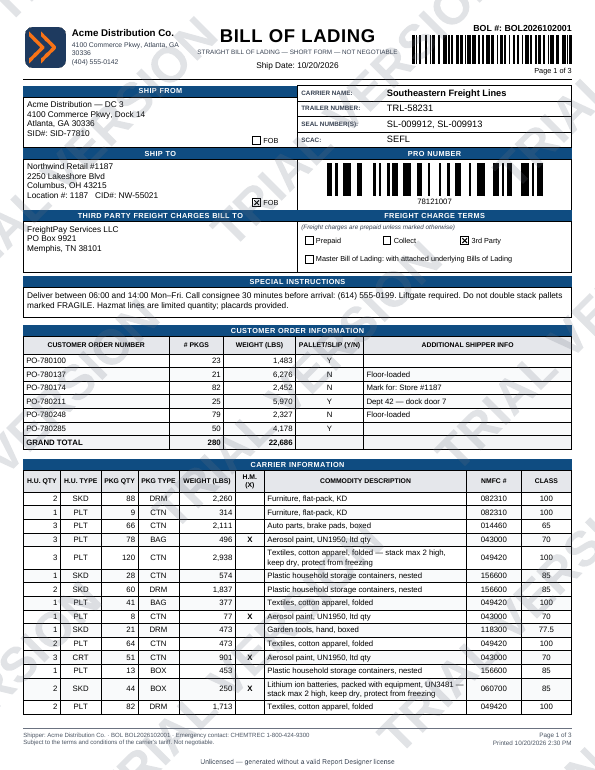
- In a final PDF: without a valid license, large diagonal TRIAL VERSION text runs across each page, with a small note at the bottom:
- "Generated with a Report Designer trial license": the render service runs on a trial (evaluation) license;
- "License expired — generated with an expired Report Designer license": the license has expired;
- "Unlicensed — generated without a valid Report Designer license": no license is installed, or it was not accepted.
- From the render service: the
X-License-Statusresponse header isvalid,trial,expired,missingorinvalid, and its Status page shows the license, its expiry date and the days left.
| Status | Meaning | Watermark on final PDFs |
|---|---|---|
valid |
A valid license, before its expiry date | None |
trial |
A trial license, such as the evaluation license that comes with the render service | TRIAL VERSION |
expired |
The license's expiry date has passed | TRIAL VERSION, "License expired" |
missing |
No license is installed | TRIAL VERSION, "Unlicensed" |
invalid |
The license key is damaged or not valid for this product | TRIAL VERSION, "Unlicensed" |
What happens when a license expires
Rendering never stops. A license is valid through the end of its expiry date (UTC). From the next day, every page carries the watermark again until a renewed license is installed. There is no grace period and no warning in the documents beforehand: your administrator sees the expiry date and the days left on the render service's Status page.
Installing or renewing a license
Your vendor sends a license key: one line of text that starts with RD2.. Your administrator installs it on the render service. Template authors don't
need to do anything, and templates don't need to change. The same template renders clean output once the license is valid.
Note: The watermark is added by the engine on top of every page, so no template setting can remove or cover it. The way to remove it from final PDFs is a valid license on the render service.